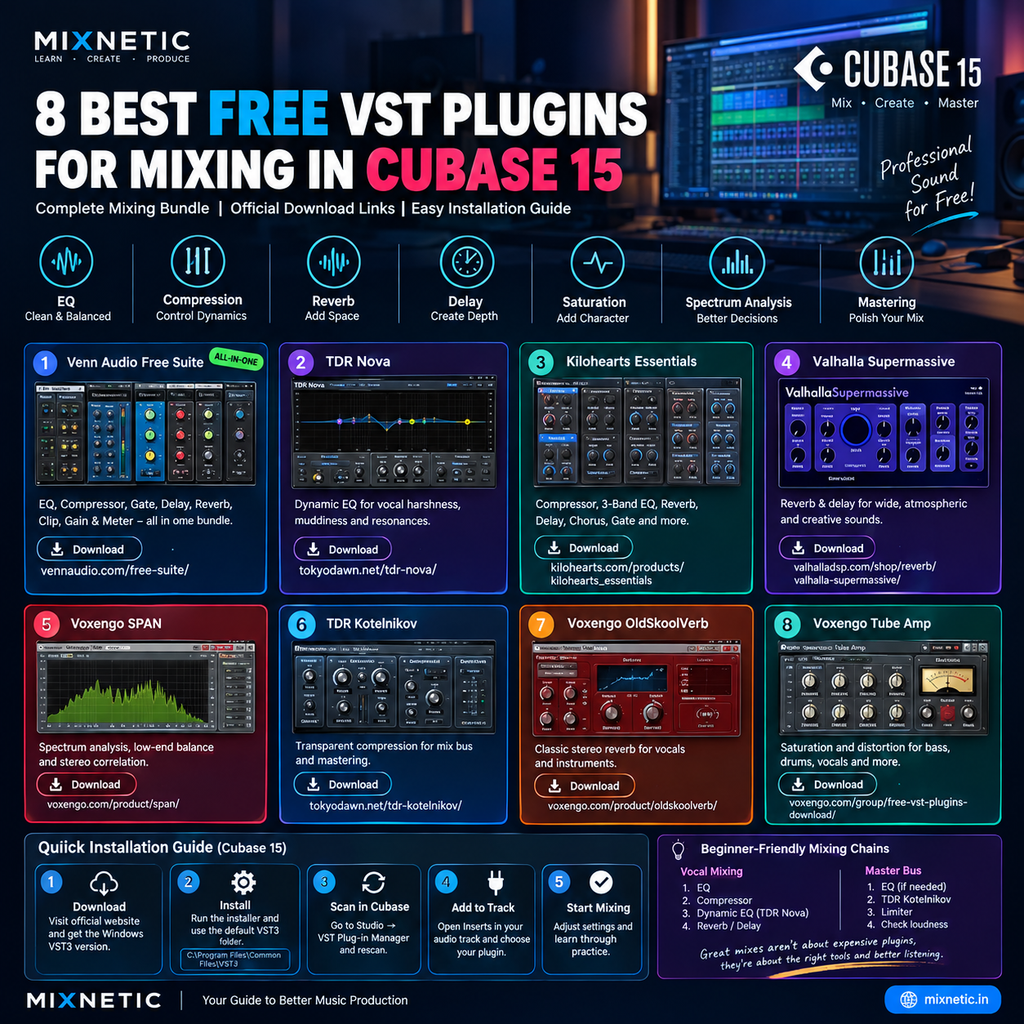
Starting your music production journey does not mean you need to spend hundreds of dollars on professional audio plugins. Many excellent free VST plugins provide the essential tools needed for vocal mixing, beat mixing, sound processing, and mastering.
If you use Steinberg Cubase 15, you can combine its built-in audio effects with free third-party plugins to build a capable mixing setup.
In this guide, we will explore eight useful free VST plugins, their main features, official download links, and a beginner-friendly installation process.
1. Venn Audio Free Suite
Best for: Beginners who want an all-in-one collection of mixing tools.
Venn Audio Free Suite offers a collection of audio processing tools designed for everyday music production tasks. Depending on the included modules, you can use the suite for equalization, dynamics, gating, clipping, delay, reverb, and metering.
Official download: https://www.vennaudio.com/free-suite/
Best uses:
- Basic vocal processing
- Track-level mixing
- Audio dynamics and level control
- Creative effects
2. TDR Nova
Best for: Vocal EQ and dynamic frequency control.
TDR Nova is a dynamic equalizer that combines traditional EQ functions with frequency-dependent dynamics processing. It is especially useful when certain vocal frequencies become harsh only during louder sections.
Official download: https://www.tokyodawn.net/tdr-nova/
Best uses:
- Controlling harsh vocal frequencies
- Reducing boxiness and muddiness
- Managing problematic resonances
- Fine-tuning instruments and buses
3. Kilohearts Essentials
Best for: A versatile collection of creative effects.
Kilohearts Essentials includes a variety of audio effects, such as EQ, compression, delay, reverb, chorus, limiting, and other sound-design tools.
Official download: https://kilohearts.com/products/kilohearts_essentials
Best uses:
- Vocal effects
- Beat processing
- Sound design
- Creative transitions and textures
Check the developer’s current licensing and installation requirements before downloading.
4. Valhalla Supermassive
Best for: Reverb, delay, and spacious sound design.
Valhalla Supermassive is a free effect plugin designed for large reverberant spaces, echoes, and atmospheric effects. It can add depth to vocals, pads, synths, and melodic elements.
Official download: https://valhalladsp.com/shop/reverb/valhalla-supermassive/
Best uses:
- Vocal delay effects
- Long reverb tails
- Ambient textures
- Wide melodic sounds
For a cleaner vocal mix, try using it on a separate FX channel and control the amount with a send.
5. Voxengo SPAN
Best for: Spectrum analysis and frequency monitoring.
Voxengo SPAN is a real-time spectrum analyzer that helps producers understand the frequency distribution of their audio. It is useful when comparing the low end, midrange, and high frequencies of different tracks.
Official download: https://www.voxengo.com/product/span/
Best uses:
- Checking bass and kick frequency balance
- Comparing tonal balance between tracks
- Monitoring stereo correlation
- Learning how different sounds occupy the frequency spectrum
Remember that a spectrum analyzer supports your listening decisions. A visually flat spectrum is not necessarily the goal of a good mix.
6. TDR Kotelnikov
Best for: Transparent compression.
TDR Kotelnikov is a mastering-oriented dynamics processor designed for controlling dynamic range while maintaining the character of the original signal.
Official download: https://www.tokyodawn.net/tdr-kotelnikov/
Best uses:
- Mix bus compression
- Gentle mastering compression
- Controlling excessive peaks
- Learning compressor attack, release, and ratio settings
Start with subtle gain reduction and compare the processed and unprocessed signals at similar loudness.
7. Voxengo OldSkoolVerb
Best for: Classic algorithmic reverb.
OldSkoolVerb is a free stereo reverb plugin that can help place vocals and instruments in a more convincing acoustic space.
Official download: https://www.voxengo.com/product/oldskoolverb/
Best uses:
- Vocal ambience
- Snare and percussion reverb
- Adding depth to instruments
- Creating a sense of space in a mix
Use shorter decay times when you want the vocal to remain clear and present.
8. Voxengo Tube Amp
Best for: Saturation and distortion.
Voxengo Tube Amp can add harmonic coloration and distortion to audio signals. Used carefully, saturation can help certain sounds feel denser or more prominent in a mix.
Official download: https://www.voxengo.com/group/free-vst-plugins-download/
Best uses:
- Adding character to bass
- Giving drums extra edge
- Creative vocal processing
- Distortion and harmonic coloration
Start with a subtle amount and check the result at matched loudness to avoid mistaking increased volume for improved sound quality.
How to Install Free VST Plugins in Cubase 15
Follow these steps to install and use third-party plugins on Windows.
Step 1: Download the plugin
Visit the developer’s official website and download the Windows-compatible version. When available, choose the 64-bit VST3 version.
Step 2: Install the plugin
Run the installer and follow the instructions. The standard Windows VST3 folder is:
C:\Program Files\Common Files\VST3
Use the default location unless the developer specifies otherwise.
Step 3: Open Cubase 15
Launch Cubase after installation. If Cubase was already running, restart it so that it can detect the newly installed plugins.
Step 4: Open VST Plug-in Manager
Navigate to:
Studio → VST Plug-in Manager
Check whether your newly installed plugin appears in the list. If it does not, use the available rescan options and confirm that the plugin was installed in a supported location.
Step 5: Insert the plugin on an audio track
Select an audio track and open its Inserts section in the Inspector or MixConsole. Choose your plugin from the list and adjust its settings while listening to the audio.
For additional help, consult the official Steinberg documentation:
Beginner-Friendly Vocal Mixing Chain
A simple vocal mixing chain can help you learn how each effect changes the sound.
- EQ: Remove unnecessary low-frequency rumble and reduce unwanted resonances.
- Compressor: Control vocal dynamics and help maintain a consistent level.
- Dynamic EQ: Reduce harsh frequencies only when they become excessive.
- Reverb: Add depth and a sense of space.
- Delay: Create echoes, vocal throws, and rhythmic effects.
You do not need every plugin on every track. Use each effect only when it improves the result.
Basic Mastering Chain for Beginners
For a simple mastering workflow, consider the following order:
- Corrective EQ, if needed.
- Gentle bus compression, if needed.
- Limiting to control peaks and reach the intended output level.
- Final loudness and true-peak checks.
Cubase’s built-in tools may already cover several of these tasks. Avoid excessive compression and limiting, and always compare the final result with a reference track at similar playback loudness.
Are Free VST Plugins Good Enough for Professional Mixing?
Yes. Free plugins can be used in professional music production when they offer the controls and sound quality required for the task.
However, the final result depends on source recording quality, arrangement, gain staging, monitoring, processing decisions, and critical listening. A paid plugin does not automatically produce a better mix.
For beginners, learning a few tools thoroughly is often more valuable than collecting dozens of plugins.
Final Thoughts
These eight free VST plugins can help you build a practical starting collection for Cubase 15 without purchasing a paid mixing bundle.
Start with TDR Nova for dynamic EQ, Voxengo SPAN for frequency analysis, and a versatile effects suite. Add Valhalla Supermassive for creative space and TDR Kotelnikov when you are ready to learn bus compression.
Download plugins only from their official developer websites, check compatibility with your system, and save your own presets as you develop your mixing skills.
Explore more music production guides and free audio tools at Mixnetic.in.
Website: https://mixnetic.in/